Expired domain name: What should you do? Impact, timeframes, costs and solutions
What really happens when a domain name expires, and how can you recover it before it is too late?
31
An expired domain name is not lost immediately. It first goes through a grace period (also known as a late renewal period), during which you can renew it at the standard renewal price. This is followed by a redemption period, which is more expensive. Finally, if no action is taken, the registry permanently deletes the domain name and releases it back onto the market on a first come, first served basis.
The procedures and timeframes vary depending on the extension:
- gTLDs (such as .COM or .NET) follow ICANN rules,
- ccTLDs (such as .FR or .UK) follow the rules set by their national registry.
Keep in mind: the sooner you act, the lower the cost, and the greater your chances of recovering your domain name.
An inaccessible website, e-mails no longer working, an unexpected error message… After checking your customer account, the verdict is clear: your domain name has expired.
Your first reaction may be to panic. However, here is the good news: an expired domain name does not necessarily disappear immediately. In most cases, registries provide several mechanisms that still allow you to recover it. However, the timeframes are limited, and additional fees may apply.
What actually happens after a domain name expires? How long do you have to take action? What are the differences between generic extensions and country code extensions? Above all, how can you recover an expired or deleted domain name?
In this guide, we review every stage of an expired domain name’s lifecycle so that you know exactly what to do in each situation.
Lifecycle of a domain name at a glance
A domain name is not purchased permanently. It is registered for a fixed period, usually between 1 and 10 years. This registration must be renewed regularly through your registrar. If it reaches its expiry date without being renewed, the domain name follows a specific lifecycle defined by the registry responsible for its extension.
👉 Before looking at each stage in detail, here is a summary diagram to help you understand the complete lifecycle of a domain name:
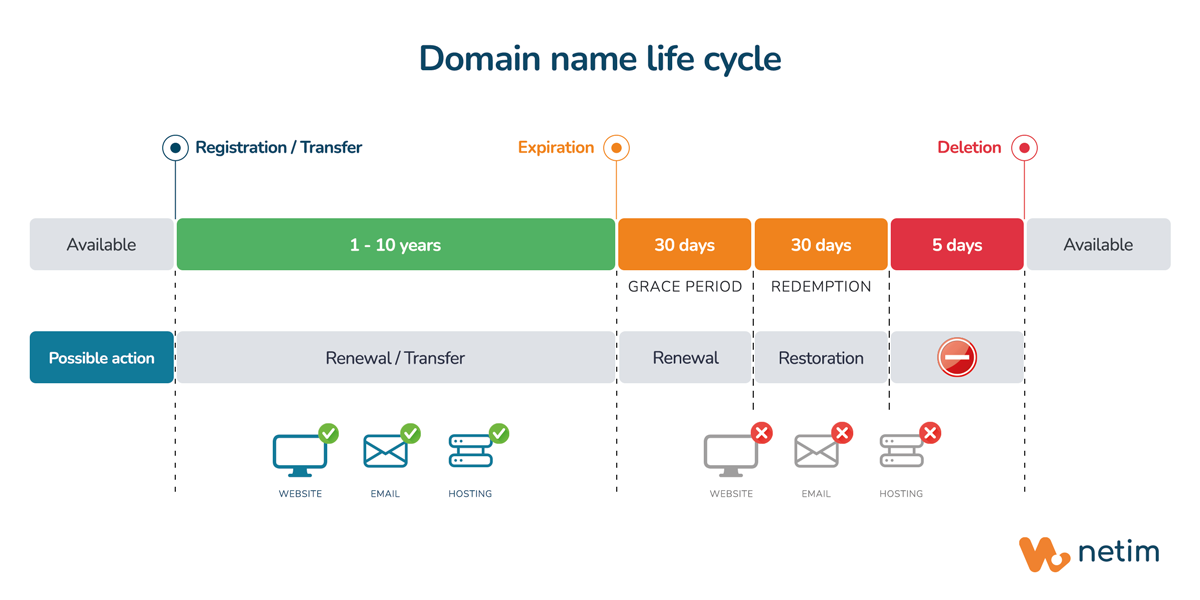
In most cases, three main phases follow the expiry date:
- a grace period, during which the domain name can still be renewed at the standard renewal price;
- a redemption period, during which the domain name can still be restored, although the process is more expensive than a standard renewal;
- then permanent deletion, after which the domain name can be registered by anyone.
We will examine each of these stages in the rest of this article.
📝 Note:
The timeframes and periods presented here mainly apply to gTLDs (generic extensions such as .COM or .NET) managed by Netim. Some registrars may apply longer or shorter grace periods (late renewal).
For ccTLDs (country code extensions such as .FR or .UK), each extension is managed by its own registry and may follow different rules. We will explain these differences in greater detail throughout this article.
💡 If you are not familiar with these concepts, our article on the differences between ccTLDs and gTLDs will help you understand them more clearly.
Impacts of an expired domain name
What actually happens?
When a domain name expires, the associated services quickly stop working (more or less quickly depending on your registrar’s policy or the registry responsible for the extension):
- DNS resolution is gradually interrupted;
- your website therefore becomes inaccessible (DNS error or parking page);
- your e-mail addresses stop receiving messages, and incoming e-mails are rejected;
- your SSL/TLS certificate remains valid until its expiry date, but it no longer functions.
In other words, even if the domain name is not yet permanently lost, its expiry can quickly have visible consequences for your business.
If your website remains inaccessible for several days, search engines may begin detecting repeated errors. If your domain name remains expired for too long, it may lead to the gradual de-indexing of some pages in search engines and therefore to a loss of SEO authority…
How can I check if my domain name has expired?
If you notice a service interruption, do not waste any time. Check the status of your domain name immediately from your customer account or by using a Whois lookup service.
This status will tell you which stage your domain name is in and what actions you can still take:
| Status | EPP code | When it appears | What it means |
|---|---|---|---|
| The domain name is active | ok |
The standard status for a domain name with no issues. | Everything is operating normally. There are no ongoing restrictions or operations. |
| Grace period (late renewal) | autoRenewPeriod |
Immediately after the expiry date. Average duration: 30 to 45 days |
The registry has automatically renewed the domain name, but payment has not yet been received. |
| Redemption period | redemptionPeriod |
After the grace period. Duration: 30 days |
The domain name has been removed from the zone, but it can still be restored by the registrant for an additional fee. |
| Restoration in progress | pendingRestore |
If a restoration request is submitted during the redemption period. Average duration: Almost immediate |
The registrar has requested the restoration, which is awaiting confirmation from the registry. |
| Pending permanent deletion | pendingDelete |
At the end of the 30-day redemption period. Duration: 5 days |
The domain name is scheduled for deletion. No further action is possible, either for you or your registrar. |
As mentioned earlier, the timeframes shown in this table apply only to gTLDs. In practice, some registrars do not offer a grace period, or only a very short one, while ccTLDs follow timeframes and procedures defined by their own registry.
If you have just discovered that your domain name has expired, do not waste any time. The sooner you act, the easier and less expensive it will be to recover it.
Grace period: all is not lost yet
Grace period (also known as the late renewal period) begins as soon as the domain name expires. During this phase, your domain name is not yet made available to the public again. You retain priority to renew it without having to pay any restoration fees.
In principle, at this stage your domain name has already been renewed automatically by your registrar. Only your payment is still pending. However, service interruptions may already occur.
For a gTLD (.COM, .NET, .ORG, .APP…)
ICANN, which oversees generic top-level domains (gTLDs), provides for a grace period of 0 to 45 days after a domain name expires. Each registrar is free to define the exact duration it applies within this limit. At Netim, this period is 30 days.
For a ccTLD (.FR, .UK, .DE…)
Country code extensions (ccTLDs) do not follow ICANN rules. Each one is managed by its own local registry, with its own procedures and timeframes. As a result, there are no universal rules for ccTLDs. Here are a few examples:
| Extension | How it works |
|---|---|
| .FR | There is no standardised grace period. The registrar decides when to submit the deletion request to AFNIC (the registry responsible for .FR). At Netim, this period is set to 30 days. It is then followed by a 30-day redemption period. |
| .UK | The domain name can be renewed at the standard renewal price for up to 90 days after expiry. This effectively acts as a 90-day grace period, since there is no redemption period and therefore no additional restoration fees. |
| .BE | There is no standardised grace period. The registrar decides when to delete the domain name. At Netim, this period is set to 7 days. The domain name then enters a 40-day redemption period (known as “quarantine” by the registry). |
| .CM | There is no grace period and no redemption phase. The domain name becomes available immediately after its expiry date. |
Redemption period: the process turns serious
If the grace period (late renewal) has expired, your domain name enters the redemption period. During this phase, it is still possible to recover the domain name, but the process becomes more expensive.
At this stage, you are no longer renewing the domain name. Instead, you are requesting a domain name restoration.
Restoration fees, set by the registrar, are generally added to the renewal fee. The amount varies depending on the extension, the fees charged by the registry, and the registrar’s pricing policy. In practice, you should generally expect to pay between €30 and €300, in addition to the renewal fee.
For gTLDs (.COM, .NET, .ORG, .APP…)
For generic extensions, ICANN policy requires a 30-day redemption period.
From redemption… to deletion:
At the end of these 30 days of redemption, if no restoration request has been submitted, the domain name enters one final technical phase: the EPP pendingDelete status, meaning that it is “pending deletion”.
This stage lasts 5 days, during which no renewal or restoration is possible, either for you or your registrar. At the end of these five days, the registry permanently deletes the domain name, making it available for registration again.
For ccTLDs (.FR, .UK, .DE…)
For country code extensions (ccTLDs), once again, there is no universal rule. The redemption period varies from one extension to another, or may not exist at all, depending on the policies established by the registry responsible for that extension.
Likewise, the pendingDelete phase is not systematic for ccTLDs. The status may have a different name, last more or less than five days, or not exist at all, depending on the registry’s procedures.
Here are a few examples:
| Extension | How it works |
|---|---|
| .ES | A grace period of around 10 days, with no redemption phase and no pendingDelete status. The domain name then becomes immediately available for registration again. |
| .NL | No grace period and no pendingDelete phase, but a 40-day redemption period. |
| .AU | A 30-day grace period, followed by 2 days in “Expired Pending Purge” status (a lock similar to pendingDelete), but no redemption period. |
| .IO | A ccTLD that operates like a gTLD: a 30-day grace period, followed by a 30-day redemption period, and finally 5 days of pendingDelete. |
Your domain name has been deleted: what you need to know
Once the registry has permanently deleted the domain name, it becomes available for registration again on a first come, first served basis. You can therefore try to register it again, just like any new domain name.
However, this becomes much more difficult if the domain name is attractive, well ranked in search engines, has a long history, and/or generates significant traffic…
Why is it so difficult to recover a domain name?
Some specialised companies, known as drop catchers, monitor expired domain names in order to register them automatically as soon as they are released. This practice is sometimes part of a domain grabbing strategy, which consists of acquiring domain names for speculative purposes, particularly to resell them at a higher price, often to their former owners who are willing to pay almost any price to recover them.
In other words, if your former domain name has value, you will not only be competing with other internet users, but also with professionals capable of acting within fractions of a second.
Backordering: a way to maximise your chances
To maximise your chances of recovering your domain name, you can use a backordering service. These specialist providers can act on your behalf and attempt to automatically capture (drop catch) your domain name as soon as it is released. While this solution significantly improves your chances, it cannot guarantee success if several parties are competing for the same domain name.
If someone else registers your domain name even though it matches your registered trademark, specific dispute resolution procedures may allow you to recover it, such as UDRP for gTLDs or SYRELI for .FR, for example.
How can you make sure this never happens?
Ultimately, the best way to deal with domain name expiry is, unsurprisingly, to prevent it from happening in the first place. A few good practices can help you avoid unnecessary risks:
- Enable automatic renewal as soon as you register your domain name, and regularly check that your payment method is still valid. Automatic renewal is of no use if your bank card has expired.
- Keep a valid contact e-mail address and check it regularly. This is the address that receives renewal reminders, expiry notifications, and any payment failure alerts. Under the ICANN Expired Registration Recovery Policy (ERRP), registrars are required to send at least two reminders before a gTLD expires.
- Read your registrar’s terms of service carefully. Renewal periods, possible grace periods, restoration fees, and the procedures that apply after expiry all vary from one registrar and one extension to another.
- Plan ahead if you manage multiple domain names. A simple tracking spreadsheet, calendar, or management tool can be enough to prevent you from forgetting to renew a secondary domain name or an old project that you no longer monitor regularly.
At Netim, an ICANN-accredited French registrar for more than 20 years, you can enable automatic renewal for one or several services in just a few clicks. You can also check your domain names’ expiry dates at any time from your customer account, allowing you to manage your renewals with complete peace of mind.
You may also be interested in:



🖊️ Discover all our articles related to domain names.
📧 Don’t forget to subscribe to our newsletter from your Netim Direct account to receive all our news and special offers!