At a time when cyberattacks are becoming increasingly frequent and sophisticated, website security has never been more important. Every day, thousands of internet users fall victim to phishing, data interception (passwords, banking details, personal information, etc.) or online identity theft.
In the face of these threats, the SSL certificate has become an essential shield for any modern website, whether it’s an e-commerce shop, a blog or a business website. It enables the activation of the secure HTTPS protocol, which encrypts all communications between your server and your visitors. More than just a security feature, SSL has become a true mark of trust: the little padlock in the address bar reassures users and guarantees that their data is protected.
In this article, we explain what an SSL certificate is, how it works, why it is essential nowadays, and how to choose the right one for your website.
What is an SSL / TLS certificate and how does it work?
SSL and TLS certificates… they’re the same thing! 💡
The SSL protocol (“Secure Sockets Layer”) is simply the predecessor of the TLS protocol (“Transport Layer Security”)! Although “SSL certificate” is still widely used, it is more of a linguistic habit.
In reality, the original SSL protocol (developed by Netscape in 1994) was replaced by the TLS protocol (developed by the IETF in 1999), which is a more secure and improved version.
However, the term “SSL” has remained in everyday language, and we use “SSL certificate” or “TLS certificate” interchangeably to refer to the same thing.
What is the purpose of an SSL / TLS certificate?
An SSL certificate is a digital file installed on your server that enables a cryptographic protocol which secures communication between your website and its visitors.
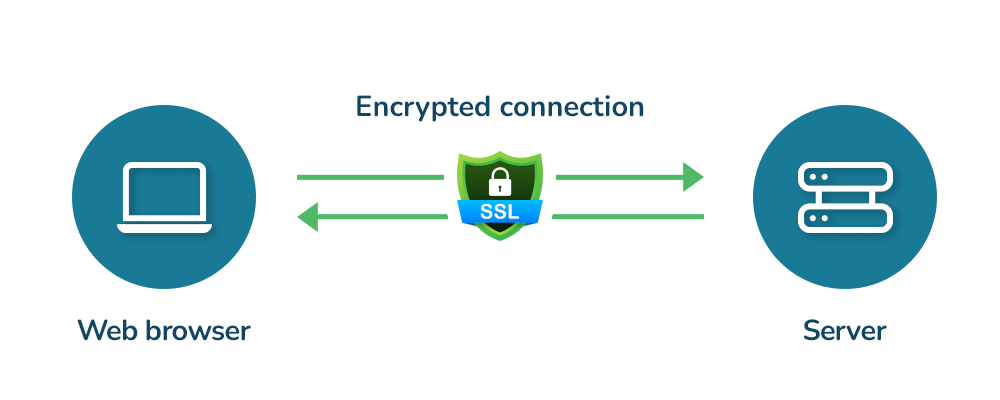
It is the installation of the SSL certificate that allows your website to switch from “HTTP” to “HTTPS”:
-
- HTTP = HyperText Transfer Protocol
Data circulates unencrypted and can be intercepted.
Browsers display the warning “Not secure” :

- HTTPS = HyperText Transfer Protocol Secure
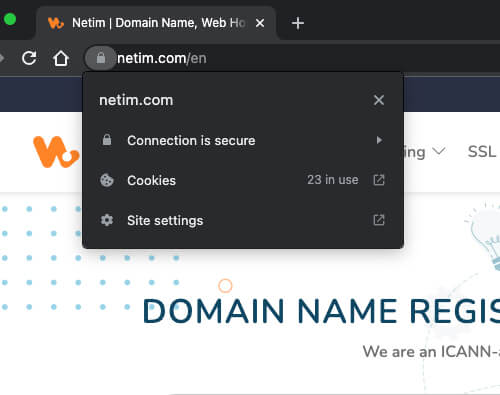
The connection and data are encrypted, the site is authenticated and browsing is secure.
A padlock symbol appears in the address bar:

- HTTP = HyperText Transfer Protocol

How does the SSL / TLS protocol work?
The SSL / TLS protocol is based on an encryption system using a pair of public / private keys:
- A public key: used to encrypt data sent by the browser.
- A private key: stored on the server to decrypt this data.
The principle is simple: like a secure letterbox, what is encrypted with the public key can only be decrypted with the matching private key, and vice versa.
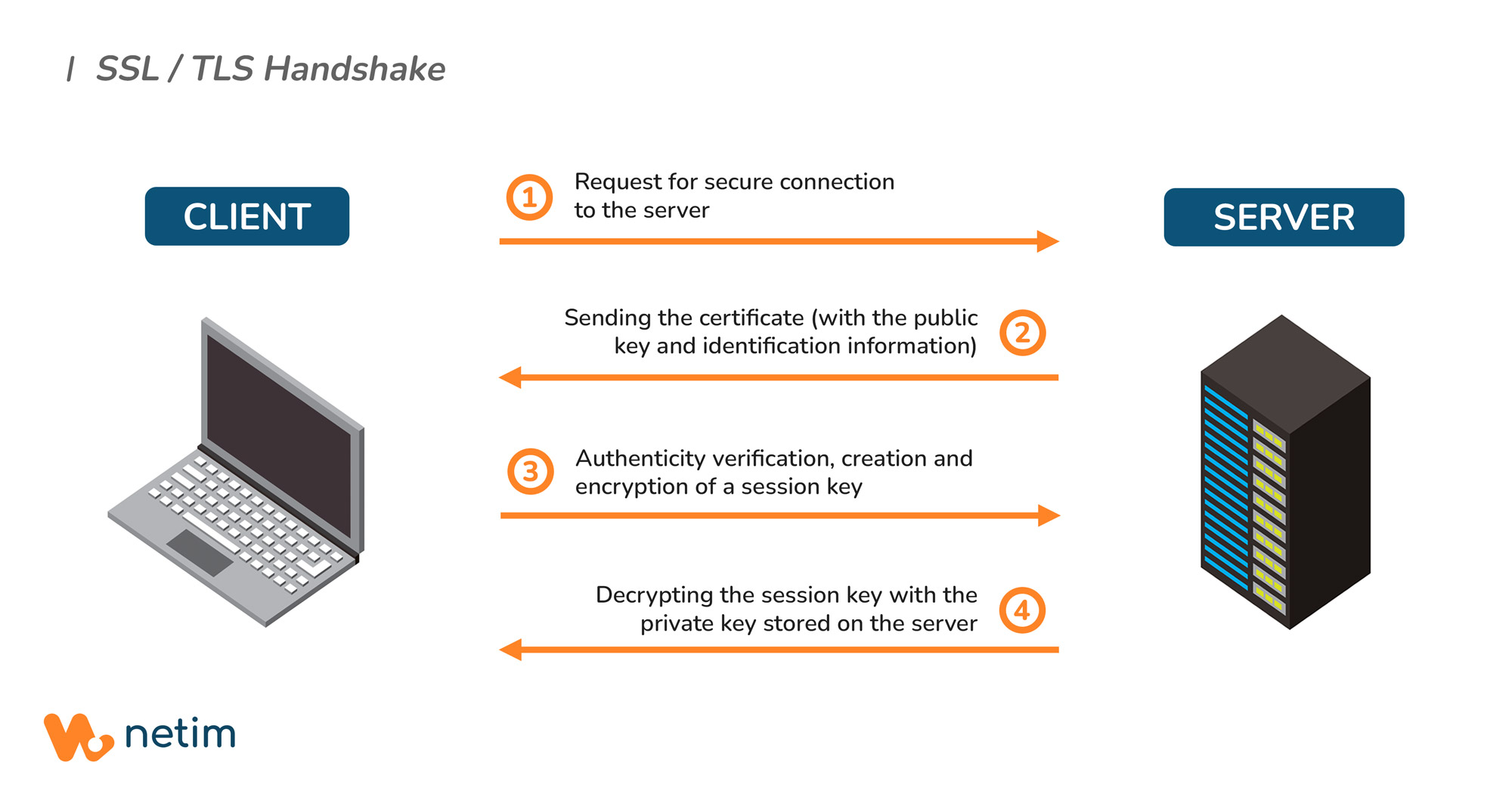
When you connect to an HTTPS site, an “SSL handshake” takes place within a few milliseconds. Without going into detail, here is what happens:
- Connection: Your browser requests a secure connection to the server
- Certificate presentation: The server responds by sending its SSL certificate, which contains its public key and identification details
- Verification: Your browser checks the authenticity of the SSL certificate with the Certification Authority (CA) that issued it (Digicert, Sectigo, Let’s Encrypt, GlobalSign…)
- Creation of a session key: Once validated, the browser generates a unique session key, encrypts it with the server’s public key, and sends it
- Decryption: The server decrypts this session key using its private key
- Secure communication: From then on, all communications are encrypted using this session key.
Thanks to this mechanism, the data exchanged (passwords, credit card numbers, personal information) cannot be intercepted or altered by a third party. Additionally, the entire process is almost instantaneous and completely invisible to the user.
What is the validity period of an SSL / TLS certificate?
For security reasons, SSL certificate validity periods have significantly decreased over the years:
- Before 2015: Certificates could be valid for up to 5 years
- 2015: Maximum validity of 39 months
- 2018: Maximum validity of 27 months (825 days)
- Since 2020: Maximum validity of 13 months (398 days)
In the near future, these validity periods will again be reduced. Here is the schedule of the next reductions approved by the CA/Browser Forum in 3 phases:
- 5 March 2026: validity will be reduced to 200 days,
- 15 March 2027: validity will be reduced to 100 days,
- 15 March 2029: validity will be reduced to 47 days
Why install an SSL / TLS certificate and which one should you choose?
What are the benefits of an SSL certificate?
- Trust and credibility
Websites still using HTTP (without SSL certificate) now display a “Not secure” warning in browsers: enough to scare visitors away instantly! Installing an SSL certificate sends a clear message: “I care about the security of my visitors.” For an e-commerce website, where customers enter their payment details and personal information, HTTPS is essential. - SEO ranking: HTTPS as a Google factor
Since 2014, Google has officially included HTTPS as a ranking signal in its algorithm. In simple terms: with identical content, an HTTPS site will rank better than an HTTP site in search results. It’s not the most important SEO factor, but still a significant one. - Legal protection and GDPR compliance
The General Data Protection Regulation (GDPR) requires European companies to protect personal data with appropriate technical measures. SSL certificates are one of the basic measures. In the event of a data breach, the absence of SSL may be considered serious negligence and could expose your business to heavy financial penalties. - For your visitors: confidentiality and data integrity
For any website visitor, an SSL certificate is a concrete guarantee that their information remains private. Every piece of data entered is encrypted before being sent to the server. Without SSL, this information circulates unencrypted and can be accessed by cybercriminals: they may steal or even modify it.
DNSSEC to secure your domain name
💡 The SSL/TLS protocol secures the communication with the site (browser – server), while the DNSSEC protocol secures the path used to reach this site (DNS resolution).
How to choose your SSL certificate?
The choice of SSL certificate depends on several criteria. According to your needs, the nature of your website and your budget, note that there are different certificate types and validation levels.
Validation levels
The validation level indicates the level of verification performed by the Certification Authority (CA). Here are the 3 internationally recognised validation levels:
- DV Certificate (Domain Validation)
This is the basic certificate, the fastest to obtain and the most affordable. The CA simply verifies that you control the domain name (usually via an email or a file placed on the server).💡 Perfect for a personal blog, a showcase website or a small e-commerce site.
- OV Certificate (Organisation Validation)
Intermediate level requiring verification of your organisation’s identity. The CA checks that your business is legally registered (company register, official documents). Issuance typically takes a few days.💡 Ideal for companies, intranets or B2B platforms.
- EV Certificate (Extended Validation)
The highest level of validation available. The CA performs a thorough verification of your organisation (legal existence, physical address, phone number, real business activity…).💡 Recommended for major e-commerce sites, banks, websites processing sensitive data or large companies.
Certificate types
These determine the scope of what the certificate protects. Here are the 3 most common certificate types:
- Single Domain Certificate
This standard certificate secures a single specific domain. For example, a certificate for www.monsite.com will only protect www.monsite.com.💡 Ideal if you have a simple site with a single domain name and no multiple subdomains. It’s the most cost-effective solution for a basic site.
- Wildcard Certificate
A Wildcard certificate covers a main domain and all its first-level subdomains. For instance, a wildcard certificate for*.monsite.comwould automatically securewww.monsite.com,blog.monsite.com,shop.monsite.com, etc.💡 Perfect if you have several subdomains to secure, far more economical than purchasing a separate certificate for each one.
- MDC (Multi-Domain Certificate)
These certificates allow multiple different domains to be secured with a single certificate. For example, you could protectmonsite.com,monsite.frandmon-autre-site.comwith a single certificate. There are also UCC (Unified Communications Certificate) certificates, which are also multi-domain certificates, originally designed for Microsoft Exchange and Office Communications Server environments.💡 Useful for businesses managing several brands or domains on a single server.
Sectigo certificates offered by Netim
 | SINGLE Protect one website | MDC Protect up to 10 websites | WILDCARD Protect your website and all its subdomains |
|---|---|---|---|
| Standard DV Certificate | €14 excl. VAT/year | from €42 excl. VAT/year (minimum of 3 websites) | €98 excl. VAT/year |
| Professional DV Certificate | €52 excl. VAT/year | from €156 excl. VAT/year (minimum of 3 websites) | €250 excl. VAT/year |
| Premium EV Certificate | €106 excl. VAT/year | from €210 excl. VAT/year (minimum of 3 websites) | For security reasons, there is no EV Wildcard. |
Some tips for installing and managing your SSL / TLS certificate
- Generating the CSR and validation with the Certification Authority
Before ordering your certificate, you must generate a CSR (Certificate Signing Request) from your hosting platform. Carefully keep the private key generated at the same time: losing it would force you to restart the process. Once your order is validated and the CA has completed verification, you will receive your certificate files by email. Store all these files safely. - Installing the certificate depending on your hosting
The installation method depends on your infrastructure:-
- Shared hosting: depending on your provider, installation is often done through the control panel;
- VPS / Dedicated server: manual configuration of your web server (Apache or Nginx) to indicate the paths to your certificate files
- Before making any changes, consult your host’s instructions: they are your best source of information for installation.
-
- Configuring all pages in HTTPS
Once your certificate is installed, set up a permanent redirect (301) to force all HTTP traffic to HTTPS. You may also enable the HSTS (HTTP Strict Transport Security) header which instructs browsers to exclusively use HTTPS for your site. Ensure that all your resources (images, JavaScript scripts, CSS stylesheets, videos) are loaded via HTTPS. Finally, you can test your entire configuration using the free SSL Labs tool. - Anticipating renewals
Given the upcoming reduction of certificate validity periods (down to 47 days in 2029), you will need to be rigorous about renewing your SSL certificates! Remember to set alerts 60 and 30 days before expiration. Also, keep in mind that orders must be placed 1 to 3 weeks in advance depending on your certificate type (faster for DV than OV/EV). Ideally, and if your provider allows it, you can also set up automatic renewal.
🖊️ Discover all our articles related to security.
📧 Don’t forget to subscribe to our newsletter from your Netim Direct account to receive all our news and special offers!